
Free shop templates
Free Auto Repair Invoice Template
By Mario Martell, former Nissan and Subaru technician and founder of Wrench Node. November 11, 2026.
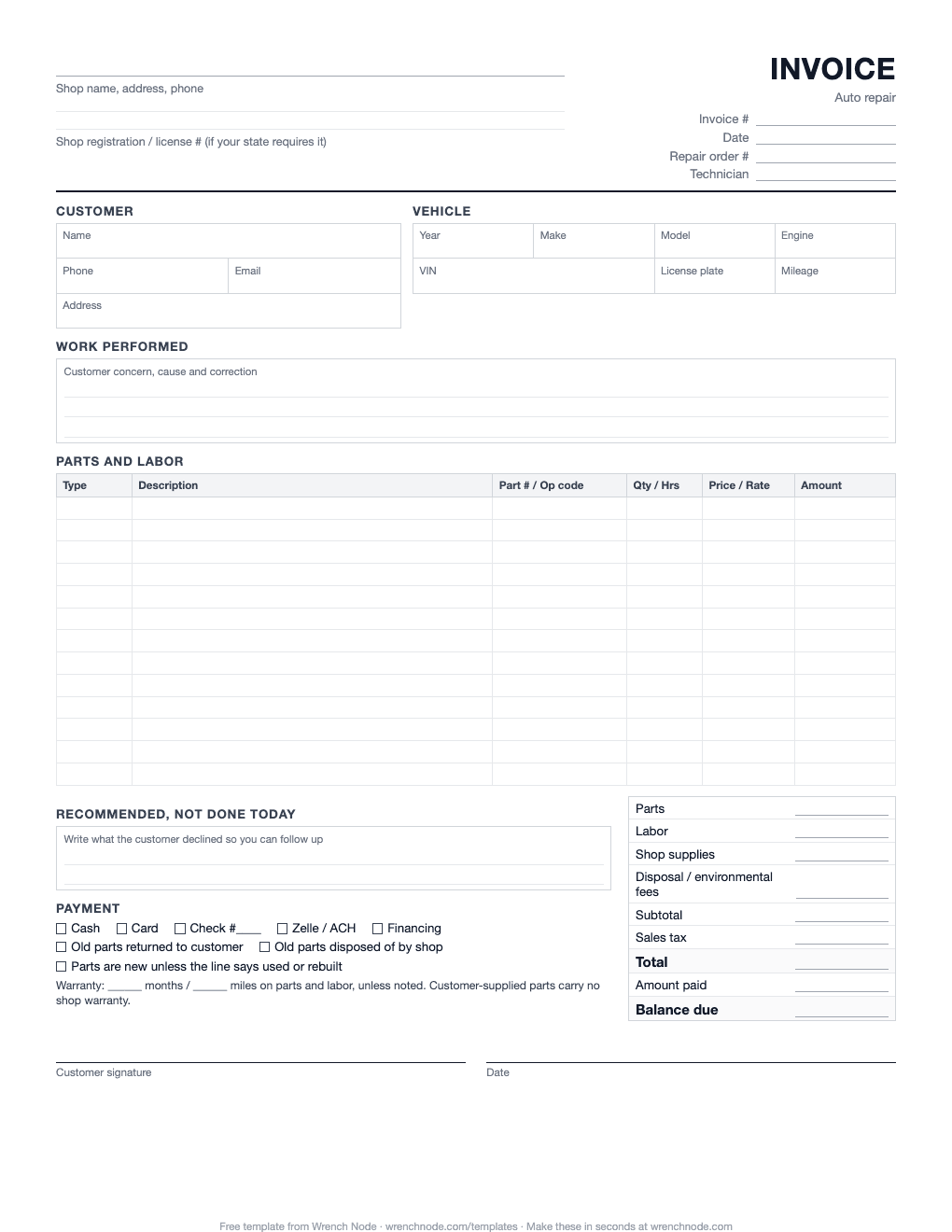
A clean, one-page invoice built the way a repair shop actually bills: every part and labor operation on its own line, shop supplies and disposal fees, tax, warranty, and a box for the work the customer said no to today. Print it and use it as is.
What's on this invoice
- Shop header with a line for your state registration or license number, which some states require on every invoice.
- Invoice, date, repair order number and technician, so you can match the invoice to the RO later.
- Customer and vehicle, including VIN, plate, engine and mileage.
- Work performed: the concern, the cause and the correction in a few lines. This is what protects you if the car comes back.
- 13 parts and labor lines with type, description, part number or op code, quantity or hours, price or rate, and amount.
- Totals: parts, labor, shop supplies, disposal and environmental fees, subtotal, tax, total, amount paid and balance due.
- Recommended, not done today: write down what the customer declined. That list is next month's work.
- Payment method, old parts, warranty and signature.
How to fill it out
- Write your shop info once at the top, then make copies. Or print a stack and stamp it.
- Copy the customer, vehicle and mileage from the repair order. Get the VIN off the car, not from memory.
- Write the concern, cause and correction in plain words: "Customer states grinding when braking. Front pads worn to metal, rotors scored. Replaced front pads and rotors."
- One line per part and one line per labor operation. Put the part number on parts and the hours on labor.
- Add shop supplies and disposal fees on their own lines, so the customer can see them.
- Total parts and labor separately, add tax only on what your state taxes, then subtract any deposit.
- Write anything you recommended that the customer declined, with a rough price.
- Mark how they paid and whether they took their old parts, then get a signature.
Mistakes that cost shops money
- Lumping everything into one line. "Brake job, $480" invites a dispute. Itemized lines don't.
- Forgetting shop supplies and disposal. On paper these get skipped when the counter is busy. A few dollars a ticket adds up to thousands a year.
- Not writing down declined work. If it isn't written, nobody follows up. Our guide on following up on declined repairs has text scripts for this.
- Math errors. Hand-totaled invoices are wrong more often than you'd think, and the mistake is usually in the customer's favor.
- No used or rebuilt note. Some states require you to say when a part isn't new. Write it on the line.
When paper stops working
Paper invoices are fine for a few cars a day. Once you're writing more than that, the time adds up: copying the RO onto the invoice, adding it up, chasing payment, and digging through a filing cabinet when someone calls about a warranty.
In Wrench Node the invoice builds itself from the repair order. Parts come in at your matrix price, labor at your rate, fees and tax are added for you, and the customer gets a text with a link to pay. Declined work goes on a follow-up list automatically. It's $79/mo with unlimited users and a 14-day free trial. See pricing or how payments work.
Frequently asked questions
What should an auto repair invoice include?
Your shop's name, address and phone (plus your state registration number if your state issues one), the customer and vehicle with VIN and mileage, each part and labor operation on its own line, shop supplies and disposal fees, sales tax, the total, what was paid and the balance, your warranty terms, and the customer's signature.
Do I have to list parts and labor separately?
In many states, yes. California and Florida, for example, require repair invoices to itemize parts and labor and to say when a part is used or rebuilt. Even where it isn't required, itemizing prevents most billing disputes. Check your state's motor vehicle repair rules.
Is this invoice template really free?
Yes. Download the PDF and print as many as you want. No email or signup.
Can I fill it out on my computer?
The PDF is made for printing and writing by hand. If you want invoices typed, totaled and texted to the customer, Wrench Node does that from the repair order. There's a 14-day free trial.
Should I charge sales tax on labor?
It depends on the state. Parts are taxable in most states. Repair labor is exempt in many states and taxable in some. Check with your state's department of revenue, and keep taxable and non-taxable amounts separate on the invoice.
More free shop templates
- Mechanic Invoice Template: A simpler invoice for mobile and solo mechanics: labor, parts, trip fee and payment.
- Auto Repair Estimate Template: A written estimate with priorities, line-by-line approval and the authorization limit.
- Repair Order Template: The drop-off form: concerns in the customer's words, vehicle condition, jobs and authorization.
- Auto Repair Work Order Template: The technician's copy with no prices: jobs, complaint, cause, correction, parts used and QC.
This template is a general starting point, not legal advice. Invoice requirements vary by state; check your state's motor vehicle repair rules.
Invoices that build themselves from the repair order.
Text-to-pay, tax and fees added for you, and declined work tracked. 14-day free trial.